
What Is Sui Gas and Who Can Check Their Bill Online?
Sui Gas is the colloquial name for natural gas distributed across Pakistan through two state-owned utilities: Sui Northern Gas Pipelines Limited (SNGPL), which serves Punjab, Khyber Pakhtunkhwa, Islamabad Capital Territory, Azad Jammu & Kashmir and Gilgit-Baltistan; and Sui Southern Gas Company (SSGC), which serves Sindh and Balochistan. Both companies supply gas to millions of domestic, commercial and industrial consumers, and both issue monthly gas bills based on metered consumption. Any consumer with a valid consumer number — printed on every physical bill — can check their bill online for free and without any registration.
Checking your bill online has replaced the need to wait for the postal delivery or visit a gas company office. The official portals of SNGPL (www.sngpl.com.pk) and SSGC (www.ssgc.com.pk) both allow consumers to view their current bill directly. SuiGasBills.pk simplifies the process further by directing you straight to the official bill retrieval with the correct consumer number format for each company — preventing the frustrating error of entering an SSGC number on the SNGPL portal or vice versa. The service works 24 hours a day, 7 days a week, from any device with an internet connection.
Every Pakistani household that receives a monthly gas bill from SNGPL or SSGC is eligible to use this free online service. The only requirement is your consumer number — the unique identifier printed at the top of every paper bill. No registration, no email address, no password and no fee is ever required. Millions of Pakistani consumers check their gas bills online each month, making it the fastest and most convenient way to know exactly how much you owe and when payment is due.
Step-by-Step: Check Your SNGPL Bill Online
Checking an SNGPL bill online takes under 30 seconds when you have your consumer number ready. SNGPL issues 11-digit consumer numbers, sometimes called Account IDs, printed prominently on the top-left area of your physical bill. This number begins with your circle code and uniquely identifies your account in SNGPL's national billing system. The 11-digit format is non-negotiable — entering 10 or 12 digits will return an error immediately.
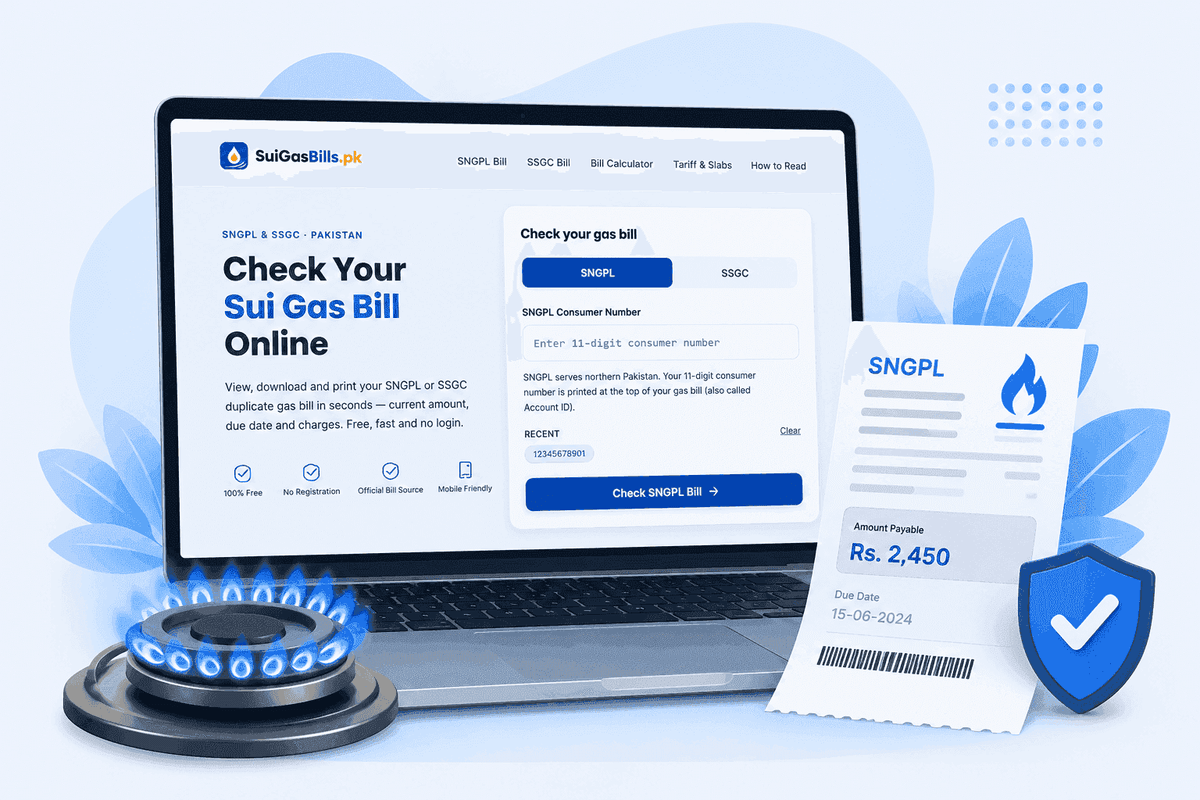
To begin, visit SuiGasBills.pk and click 'SNGPL Bill Check' from the navigation menu or the provider cards displayed on the home page. A simple form prompts you to enter your 11-digit SNGPL consumer number. Type the digits carefully — do not include spaces, dashes or any other characters. Once you click the check button, you will be directed to the official SNGPL bill retrieval portal, where your current monthly bill loads immediately. The bill shows your payable amount, due date, meter readings, gas consumed in cubic metres and MMBTU, slab-wise charges, fixed charge, GST, arrears and the after-due-date amount all in one place.
SNGPL also offers an SMS bill service for consumers without internet access. Send your 11-digit consumer number as an SMS to 9879 from any Pakistani mobile network — Jazz, Zong, Telenor, Ufone or Warid. Within minutes, SNGPL's automated system will reply with a text message summarising your current bill, including the payable amount and due date. This service is especially useful when you are traveling and need a quick reference without opening a browser.
- 1Visit SuiGasBills.pk and click 'SNGPL Bill Check'
- 2Enter your 11-digit SNGPL consumer number (no spaces or dashes)
- 3Click the 'Check SNGPL Bill' button
- 4Your official SNGPL bill opens — note the payable amount and due date
- 5Print the bill or save it as a PDF using your browser's print function
Step-by-Step: Check Your SSGC Bill Online
SSGC consumers in Sindh and Balochistan use a 10-digit customer number, also called a reference number, to access their bills online. This 10-digit number appears in the account information panel on every SSGC paper bill. The format differs from SNGPL's 11-digit number both in length and structure, and using the wrong format on either company's portal will return an error. Always confirm which company serves your area before entering your number: if you live in Karachi, Hyderabad, Sukkur, Quetta or any other city in Sindh or Balochistan, your bills come from SSGC.
To check your SSGC bill, visit SuiGasBills.pk and choose 'SSGC Bill Check' from the navigation or home page. Enter your 10-digit SSGC customer number in the form. After submitting, you are taken to the official SSGC bill page for your account, which shows all the same information as the physical bill: gas consumed, billing period, current charges, fixed charge, GST, arrears, total payable and due date. The SSGC helpline is 1199, available around the clock if you have trouble retrieving your bill or have any billing queries.
SSGC's service territory covers some of the most populous and geographically diverse regions of Pakistan. Karachi — the country's largest city and commercial capital — is served entirely by SSGC, as are the major Sindhi cities of Hyderabad, Sukkur, Larkana and Mirpurkhas, and the Balochistan cities of Quetta, Hub, Gwadar and Turbat. If you are a tenant or have recently moved within these areas, the previous occupant's consumer number may still be on the bill — update your account details through the nearest SSGC regional office to ensure billing accuracy.
What Information Appears on Your Online Gas Bill?
The online gas bill retrieved from the official SNGPL or SSGC portal contains the complete information as the paper bill. The top section carries account information: your name, service address, consumer number, meter number, tariff category (protected or non-protected), billing period start and end date, issue date, and the due date. The due date is typically printed in a prominent location because it determines whether you owe the regular payable amount or the higher after-due-date amount.
The main body of the bill shows gas charges in detail. First you see your current meter reading and previous month's reading. The difference between these two readings is your consumption in cubic metres. This figure is then converted to MMBTU using the GCV (Gross Calorific Value) factor for your supply area — GCV varies slightly by region and by the source gas being supplied. Your MMBTU consumption is then split across tariff slabs: the first band is charged at the lowest rate, successive bands at increasingly higher rates, as per OGRA's annual tariff determination. Below the gas charges, you see the fixed monthly charge (Rs 600 for protected consumers, Rs 1,500 or Rs 3,000 for non-protected consumers), followed by the 18% GST calculated on gas charges plus fixed charge.
At the bottom, the bill summarises: total gas charges, total GST, fixed charge, arrears (unpaid amounts from previous bills, if any), total current charges, and the final payable amount. A separate line always shows the after-due-date payable amount — the sum you must pay if you miss the due date, which includes the surcharge. Most bills also display a consumption history for the past 6–12 months, showing your month-by-month gas usage, which helps you compare this month's consumption to your historical average.
| Bill Section | What It Shows | Why It Matters |
|---|---|---|
| Account Info | Name, address, consumer number, meter no. | Identifies your account and tariff category |
| Billing Period | Start/end date, issue date, due date | Tells you when to pay without surcharge |
| Meter Readings | Previous, current, consumption (m³, MMBTU) | Basis of all gas charges |
| Gas Charges | Slab-wise rate applied to each MMBTU band | Main variable cost of your bill |
| Fixed Charge | Rs 600 (protected) / Rs 1,500–3,000 (non-protected) | Monthly fee regardless of usage |
| 18% GST | Applied on gas charges + fixed charge | Government tax, mandatory |
| Arrears | Unpaid from previous months | Must be paid with current bill |
| Total Payable | All charges summed | Amount to pay before due date |
| After-Due Amount | Total with late-payment surcharge | Higher amount if paid after due date |
How to Download and Print Your Sui Gas Bill as a PDF
Once your bill opens on the official SNGPL or SSGC portal, you can save it as a PDF using your browser's built-in print function. On Google Chrome (Windows or Mac): press Ctrl+P or Cmd+P, then in the printer destination dropdown, select 'Save as PDF' or 'Microsoft Print to PDF', and click Save. Choose a descriptive filename like 'SNGPL-Bill-June-2025.pdf' and save it to a dedicated Bills folder on your device. This process works identically in Microsoft Edge. On Firefox, use Ctrl+P and select the PDF option from the printer list.
On an Android mobile phone, tap the browser's three-dot menu in the top right corner, select Share or Print, and then choose 'Save as PDF' from the print options. On an iPhone or iPad using Safari, tap the Share button (the box with an upward arrow at the bottom of the screen), scroll down to 'Print', then pinch outward on the print preview to extract a PDF that you can save to Files, share via WhatsApp or email to yourself. Most Pakistani banking apps also allow you to attach PDFs when filing reimbursement claims.
A PDF of your gas bill is the recommended format for record-keeping. It is smaller than a scanned paper copy, cannot be accidentally edited, preserves the official formatting and contains all the data you need for payments, reimbursements, tax records and utility history. If you use a property management service or pay bills on behalf of multiple properties, maintaining an organized PDF archive by month and by account number will save significant time when cross-checking payment records against bill amounts.
Common Errors When Checking a Gas Bill Online — and How to Fix Them
The most common error when checking a gas bill online is entering the wrong number of digits or using the wrong company's portal. SNGPL requires exactly 11 digits; SSGC requires exactly 10 digits. If you enter fewer or more digits, the portal will display an 'Invalid consumer number' error immediately. Count your digits carefully. A related mistake is confusing zeros (0) with the letter O, or ones (1) with the letter I — all consumer numbers are numeric only, so these characters are always digits 0 and 1.
Another common issue is using the meter number instead of the consumer number. The meter number is printed on the physical meter device and appears on the bill, but it is NOT the same as your consumer number or Account ID. The consumer number (sometimes labelled as Reference Number on SSGC bills) is the number used for bill retrieval — it is always in the account information box at the top of your bill. The meter number is typically shorter and in a different format.
If you receive a 'Bill not found' or 'No record for this month' message even after entering the correct number, the bill for the current month may not have been generated yet. Gas bills are typically generated 5–7 days after the meter reading date, which varies by area and meter reading cycle. If you check before the bill is generated, the portal will show no data. Wait a few days and check again, or call the helpline to confirm your meter reading date. In some rural areas, meter reading cycles can be less frequent, resulting in estimated bills or bi-monthly readings.
- Wrong digit count — SNGPL = exactly 11, SSGC = exactly 10
- Using wrong company portal (SNGPL number on SSGC site or vice versa)
- Using meter number instead of consumer/customer number
- Bill not yet generated — check again after 5-7 days from meter reading
- Typing digit errors: 0 vs O, 1 vs I — all digits are numeric
- Network or browser cache issue — try refreshing or a different browser
How to Check Your Gas Bill from a Mobile Phone
SuiGasBills.pk is fully optimized for mobile phones and works seamlessly on both Android and iOS devices. The bill check form is prominently displayed on the mobile home page, with large input fields and touch-friendly buttons. The entire bill-checking process from opening the website to viewing your bill takes less than a minute on a 4G connection. Mobile data consumption for checking a gas bill is minimal — typically under 500KB for the bill retrieval.
For the best experience on Android, use the latest version of Google Chrome or Samsung Internet browser. On iPhone, Safari provides excellent compatibility with both the SuiGasBills.pk site and the official SNGPL and SSGC bill portals. If your bill appears to load incompletely or the table layout is broken, try rotating your phone to landscape orientation — the wider display typically resolves table rendering issues on smaller screens. You can also enable 'Desktop site' in your browser settings to get the full PC version if needed.
Many Pakistani consumers prefer checking bills on their phones because it is more convenient than finding a computer, and because the mobile wallet apps (JazzCash and Easypaisa) needed for payment are also on the phone. The recommended workflow is: check your bill on SuiGasBills.pk, note the payable amount, then immediately open your payment app to complete the transaction. This end-to-end mobile process eliminates the need to write anything down and reduces the risk of entering the wrong amount when paying.
How Gas Bill Amounts Are Calculated — Understanding Your Charges
Understanding your gas bill calculation helps you verify its accuracy and anticipate future bills. The calculation begins with your metered gas consumption in cubic metres (m³). Your meter displays a cumulative total, and the difference between this month's reading and last month's reading gives your monthly consumption in m³. This m³ figure is then multiplied by the GCV (Gross Calorific Value) factor — a number between 0.9 and 1.1 that reflects the heat content of the gas in your supply area — to convert it to MMBTU (Million British Thermal Units).
Your MMBTU consumption is then charged according to OGRA's slab rates. For protected domestic consumers in FY 2025-26, the approximate rates are: 0–1 hm³ (0–100 m³ equivalent) at Rs 130/m³, 1–2 hm³ at Rs 175/m³, and above 2 hm³ at Rs 300/m³. For non-protected consumers, the rates are substantially higher: 0–1 hm³ at Rs 200/m³, 1–2 hm³ at Rs 250/m³, 2–3 hm³ at Rs 400/m³, and above 3 hm³ at Rs 700/m³. These are indicative rates expressed in m³ equivalents for clarity — actual billing uses MMBTU rates derived from OGRA's formal tariff order.
After the gas charges are calculated, a fixed monthly charge is added: Rs 600 for protected consumers, Rs 1,500 for non-protected consumers using up to 1.5 hm³/month, and Rs 3,000 for non-protected consumers using more than 1.5 hm³/month. Finally, 18% GST is applied to the sum of gas charges and fixed charge. If there are any arrears from previous months (unpaid amounts), they are added to produce the total payable amount shown on the bill.
What to Do If Your Gas Bill Seems Too High
A gas bill that seems unexpectedly high is a common concern for Pakistani consumers, particularly during and after the winter months. Before assuming an error, compare your current consumption (in m³) to the same month last year and to the previous three months. Gas bills are legitimately higher in winter because heating appliances — geysers, space heaters, gas room heaters — run for more hours in cold weather. If consumption is up in line with colder weather, the bill is likely accurate.
If consumption appears genuinely anomalous — dramatically higher in a warm month, or higher than any previous winter — there are several possible causes. A gas leak inside your home (from a cracked pipe, loose fitting, or old hose) can waste significant gas without you noticing, because the gas escapes before reaching the burner. A faulty meter that ticks faster than it should records more consumption than actually occurred. An estimated reading (where the meter reader recorded an assumed value instead of the actual dial reading) can also produce an incorrect bill.
The formal process for disputing a gas bill starts with calling the helpline (111-762-762 for SNGPL, 1199 for SSGC), reporting your concern and noting the complaint reference number given to you. If the issue is not resolved within the billing cycle, visit the nearest regional office with your bill and a record of your own meter readings. If the company does not resolve the dispute within 30 days, OGRA's consumer complaint mechanism allows you to escalate — file a complaint on ogra.org.pk or email [email protected].
Gas Bill Quick Reference: Key Numbers, Contacts and Links
Every Pakistani gas consumer should have these key numbers saved: SNGPL helpline 111-762-762 (24/7), SSGC/gas emergency helpline 1199 (24/7), SNGPL SMS bill service 9879 (send your consumer number by SMS). For online billing: SNGPL's official bill portal is accessible via www.sngpl.com.pk, and SSGC's is via www.ssgc.com.pk. SuiGasBills.pk provides a simpler, single-destination interface for both companies and links directly to their official bill portals.
For regulatory queries and formal complaints, OGRA's contact details are: website ogra.org.pk, email [email protected], and phone as listed on their website. OGRA is responsible for setting gas tariffs annually and adjudicating consumer disputes that gas companies fail to resolve within the mandated period. Its tariff determination orders are publicly available and specify the exact rates applied to each consumer category for each fiscal year.
Key self-service tools on SuiGasBills.pk that complement your bill check: the Sui Gas Bill Calculator helps you estimate your monthly bill from your consumption figure; the Protected Status Checker helps you determine whether your winter usage qualifies for the lower protected consumer slab rates; and the Duplicate Bill page walks you through getting an official copy of your bill if your paper copy is lost. Enable push notifications on SuiGasBills.pk through the notification bell in the footer to receive bill reminders when your due date approaches.
Check Sui Gas Bill Online — Frequently Asked Questions
How do I check my Sui Gas bill online for free?
What is a Sui Gas consumer number?
What is the difference between SNGPL and SSGC?
Why can I not find my gas bill online?
Is it safe to enter my consumer number online?
Can I check my gas bill on my mobile phone?
What is the SNGPL SMS bill service?
What is the due date on a Sui Gas bill?
How do I get a duplicate gas bill?
Who do I call if my gas bill has an error?
Related Guides
Check Your Gas Bill Now
SNGPL or SSGC — free, instant, no login required